
As Rainbow grows, the Agent Portal is growing with it. We’re adding new markets, products and programs, supporting larger multi-location schedules, and increasingly working with the same insureds across multiple policies and policy terms.
We want that growth to make Rainbow more useful, not more complicated to use.
That’s why we’ve built a new Rainbow design system: a shared foundation for how the Agent Portal looks, feels and behaves. As we redesign key pages and workflows, you’ll see more consistent patterns, clearer information and familiar actions across different Rainbow products.
We started with the Quote Summary page because it’s one of the most important pages in the quoting process. The redesigned experience includes:
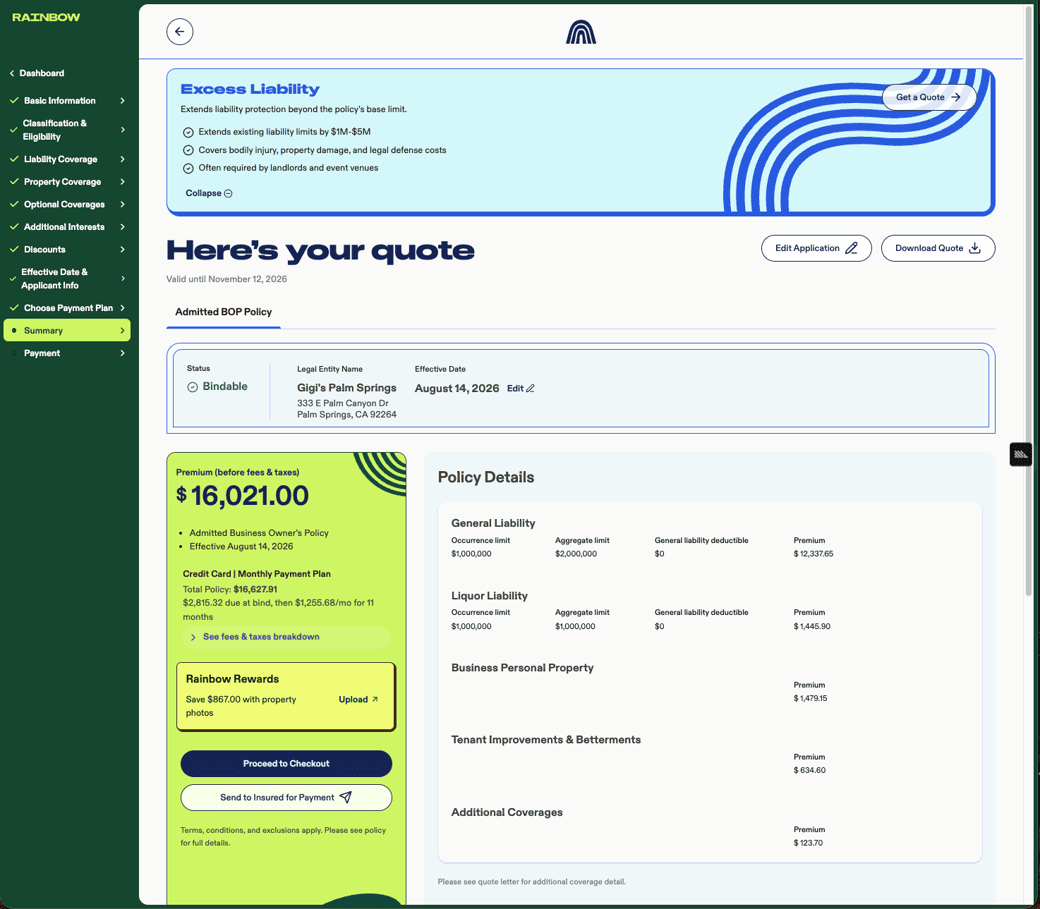
The Quote Summary page is the first major workflow we’ve rebuilt on this foundation, and you’ll see the same approach applied to other parts of the Agent Portal over time.
We’ve made a number of improvements to Excess Liability over the past few months, with the goal of making it easier to quote alongside an eligible Rainbow BOP.
You can now:
We’ve also removed the blanket referral that previously sent every Excess Liability application to Underwriting. Eligible XS quotes will now be automatically approved, while quotes that require Underwriting review will still be referred.
And we’re not quite done: Underwriting currently completes the final XS bind after the underlying BOP is bound. We’re working on the next step now — allowing agents to bind eligible Excess Liability policies directly in the Agent Portal.
Before sending an E&S quote to your insured for signature, take a moment to make sure the quote is final — particularly the effective date, payment plan and payment method.
These details matter because the insured’s quote letter reflects what they’re agreeing to, including the effective date of coverage and the Total Cost of the policy.
Both the payment plan and payment method affect Total Cost:
That means changing from monthly to paid in full, or switching between ACH and credit card, changes the Total Cost. If the insured has already signed the quote letter, they’ll need to sign an updated version reflecting the new amount. Other changes to the application may also cause the quote to rerate.
To avoid having to go back to your insured for another signature, we recommend this order:
Quoting E&S BOP + Excess Liability? The BOP and XS are separate quotes, and each requires its own compliance documents and signatures. If you’d like your insured to receive both signature requests at around the same time, send the BOP documents for signature first, then use the XS tab on the Quote Summary page to send the XS documents right after.
One distinction: the diligent search is independent of billing information, so a payment change does not mean you need to complete the diligent search again.


